Basic
Free
- 100 stored reviews
- Google, Facebook
- Badge layout
- Unlimited page views, websites and domains
Free forever, no credit card.

Squarespace
You add Google reviews to Squarespace by connecting your Google Business Profile to a reviews tool, then pasting the three-line HTML snippet it gives you into a Code Block or into Settings, Advanced, Code Injection. Squarespace runs JavaScript in those blocks only on the Core plan and above, so on the Personal plan the snippet will not execute. The reviews then refresh on their own every 24 hours.
Start freeFree plan, no credit card. Unlimited page views, websites and domains on every plan.
Code Block and Code Injection accept HTML on every Squarespace plan, but JavaScript and iframes need Core or higher (Business or higher on 7.0 sites). A reviews widget is JavaScript, so on the Personal plan it will sit there and do nothing, with no error message. Check your plan before you pick a tool, because no widget on the market gets around this: it is a Squarespace limit, not a limit of the widget.
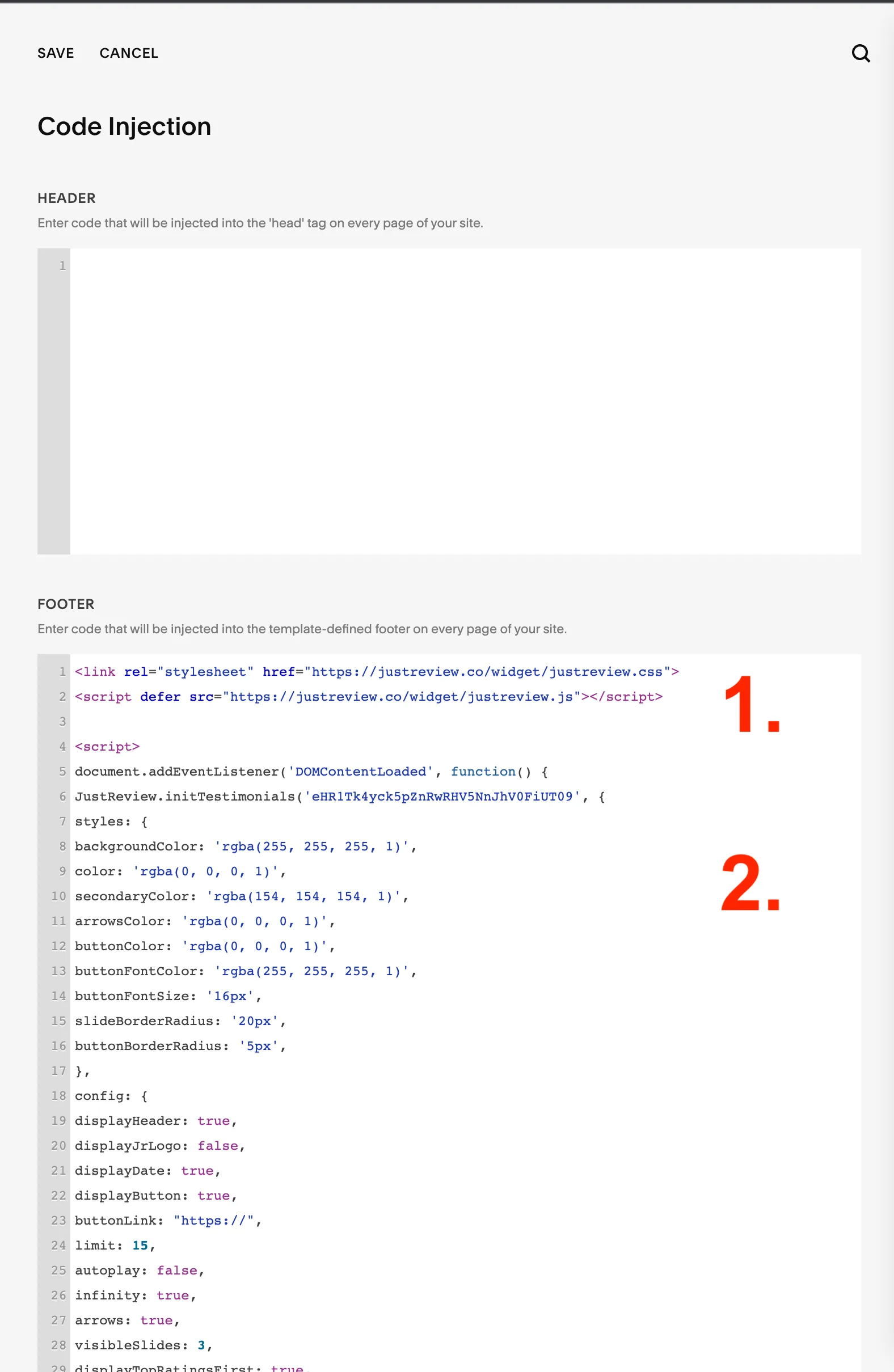
This page is the decision, not the walkthrough. For the screen-by-screen version see the step-by-step guide with screenshots, and why the editor looks empty, or the installation article in the knowledge base.
Every tool in this market advertises a free Google reviews widget and every one of them draws a line somewhere. Here is ours, before you sign up rather than after.
| What you want | Free (Basic) | Starts on |
|---|---|---|
| Google reviews imported, refreshed every 24 hours | Yes | Free |
| Facebook reviews, same terms | Yes | Free |
| Badge: floating rating and review count | Yes | Free |
| Stored reviews | Up to 100 | More on paid plans |
| Unlimited page views, websites and domains | Yes | Free |
| Carousel and counters that show the review text | No | Plus, 9 EUR / month |
| Marketplace sources (eBay, Amazon, Etsy and others) | No | Plus, 9 EUR / month |
| Widget without the JustReview credit (white label) | No | Plus, 9 EUR / month |
| Stars layout with rich snippet data | No | Pro, 19 EUR / month |
The full matrix is on the pricing page. Paid plans come with a 7-day trial and no card up front.
Free
Free forever, no credit card.
9 EUR / month
7-day free trial.
19 EUR / month
7-day free trial.
Prices verified 2026-07-26. There is a fourth plan, Ultimate, for review sources that we buy per crawl; the pricing page has the full table.
On 4 August 2026 we identified the platform behind every site running our widget: 449 of 632 hosts answered, and 16 of them were Squarespace. It is a small group next to WordPress, and it behaves differently: Squarespace sites are service businesses far more often than shops, so Google and Facebook cover almost everything they need and marketplace sources barely appear.
Squarespace sites are usually service businesses, so the reviews are doing one job: proving you are real before someone fills in the contact form. Three placements earn their space. Directly under the hero on the home page, where a first-time visitor is still deciding whether to scroll. On the page that describes the service they came for, not on a separate testimonials page nobody clicks. And immediately above the contact or booking block, because that is the moment the doubt is largest. The floating badge is the exception: it goes site-wide through Code Injection and stays out of the layout entirely, which is why it is the layout we give away for free.
Unlike WordPress or Shopify, there is no marketplace listing to compare this against. The extensions Squarespace lists for reviews are product review tools for Commerce stores, which is a different job: they collect reviews of items you sell, they do not import the reviews of your business from Google. That is why every result on this search is a third-party widget pasted as code.
Not a screenshot and not a mockup. The carousel below and the floating badge in the corner are both loaded by the same script you would paste into your Squarespace site. On your site they would show your Google reviews, in exactly these layouts. Here the badge shows our Google rating and the carousel shows our reviews from Capterra, G2 and Facebook, because that is where our English-speaking customers wrote and we would rather show you real ones than a mockup. The badge is the free layout; the carousel starts on Plus, 9 EUR a month, which is exactly the difference this page keeps talking about.
Connect the profile, pick a layout, paste three lines. Up to 100 reviews on the free plan, refreshed every 24 hours, no credit card and no expiry date.
Start freeSame widget, other platforms: Shopify, WordPress, Wix. Also useful: the Google reviews widget page, what the free plan covers, the pricing table and comparisons with other widgets.